
Google has finally come up with its official AdSense Android app through its search engine giant. It is almost like the official web version that helps you keep in touch with your AdSense earnings.
The Google AdSense App
Do you use AdSense to obtain revenue from the content on your website or blog? If yes, this new app available for free in Google Play Store will be good news for you. The most interesting perk is that it is officially made by Google. You can free you mind of duplicate and unauthentic stats.
 Once you have successfully installed the app, start it. If the account you’re using for AdSense is the same one on your Android device, you will find the earnings data right away.
But, if it is not the account you want, you may always tap the menu button situated on the top right side of the app. Tap Change account thereafter.

This app is straightforward and the interface is made user friendly like any other Google-developed app. You may also tap on the app’s icon on the top left side of the screen. A menu will pop out which will take you to all the main parts of your AdSense account.

You will be allowed to check out your Top Sites, Top URL channels, Top Custom Channels, Top Ad Units etc.

There is also a menu allowing you to change the time period for which the report is provided and get a clearer idea on your profits and losses.
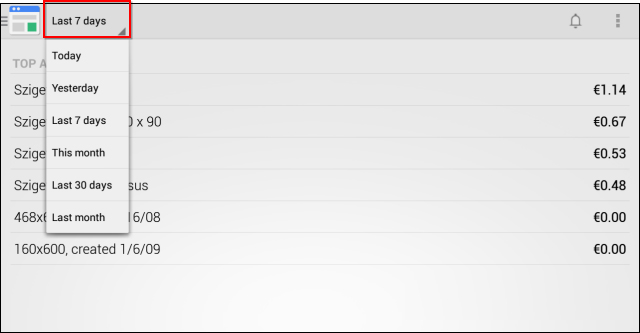
The app is quite easy to use but it has a small disadvantage. It does not allow you to modify your ads rather let you use it for reports only. Another interesting feature is that the service notifies you with a notification bell, just like they do on Google+.

Akshay Agarwal
Latest posts by Akshay Agarwal (see all)
- Indian Funky Nightwear Brand for Babies and Kids Online - November 11, 2020
- Children’s Boutique Clothing Manufacturers in India - September 25, 2020
- Kids Celebrity Designer – Aastha Agarwal to showcase her collection at India Kids Fashion Week in Jaipur - September 7, 2019