
The instant messaging app WhatsApp caught wild fire in no time. Available for iPhone, BlackBerry, Windows Phone, Android and Nokia Phones this app enables you to create groups, send unlimited audio video and image messages to the contacts in your phone, provided they are on WhatsApp.

Like every other app, this one too has its own pros and cons. Many users say that the last seen is the biggest advantage and disadvantage at the same time.
Here are a few testimonies by users:
- ‘I last saw her at 5.00 in the evening, why hasn’t she replied to the WhatsApp message I sent to her in the afternoon?”
- “This feature has ruined my relationship completely. My boyfriend is a businessman and owns two phones. He recently went to India and one of his numbers is not showing last seen nor his picture and I only see one tick mark when I send a message. I checked from a friend’s phone and I can see his online status from her phone. It’s extremely upsetting. I just swore at him cause this happened for the third time. He claims that he hasn’t blocked me but who knows? “
Well, here is good news on the way. We have come up with a solution to this problem.
Below are the steps to Hide/Disable Last Seen Time In WhatsApp For iPhone Users:
iPhone users can now easily remove last seen Timestamp with the new version of WhatsApp for iOS.
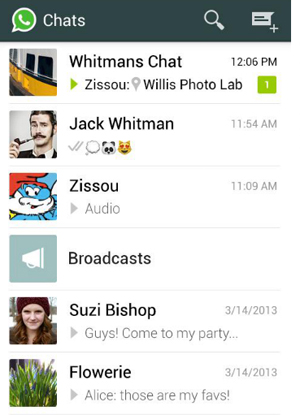
Step 1: Go to WhatsApp Messenger.
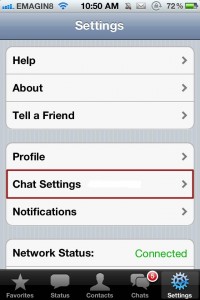
Step 2: On the ‘Setting’ Menu go to ‘Chat Setting’.
Step 3: Tap on the ‘Advanced’ option from Chat Setting

Step 4: Select “Off’ on “Last Seen Timestamp”.
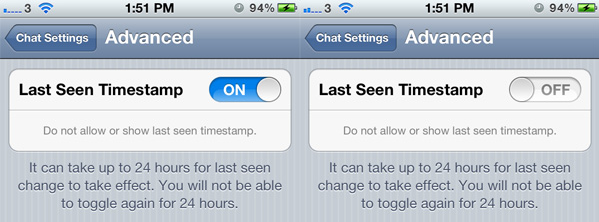
Unfortunately this option is available only for iPhone users.
However for Android users you may use the following tricks to hide your last seen time:
Step 1: Disable internet connection before opening WhatsApp. With internet disconnected read and send messages offline.
Step 2: Now close the WhatsApp and enable internet connection. WhatsApp synchronizes with your server and send your messages without updating your last seen time.
This way you may successfully disabled Last Seen TimeStamp in your iPhone, Android devices and stay away from controversies (if you know what I mean?!)

Akshay Agarwal
Latest posts by Akshay Agarwal (see all)
- Indian Funky Nightwear Brand for Babies and Kids Online - November 11, 2020
- Children’s Boutique Clothing Manufacturers in India - September 25, 2020
- Kids Celebrity Designer – Aastha Agarwal to showcase her collection at India Kids Fashion Week in Jaipur - September 7, 2019